


NEXT GEN INNOVATION
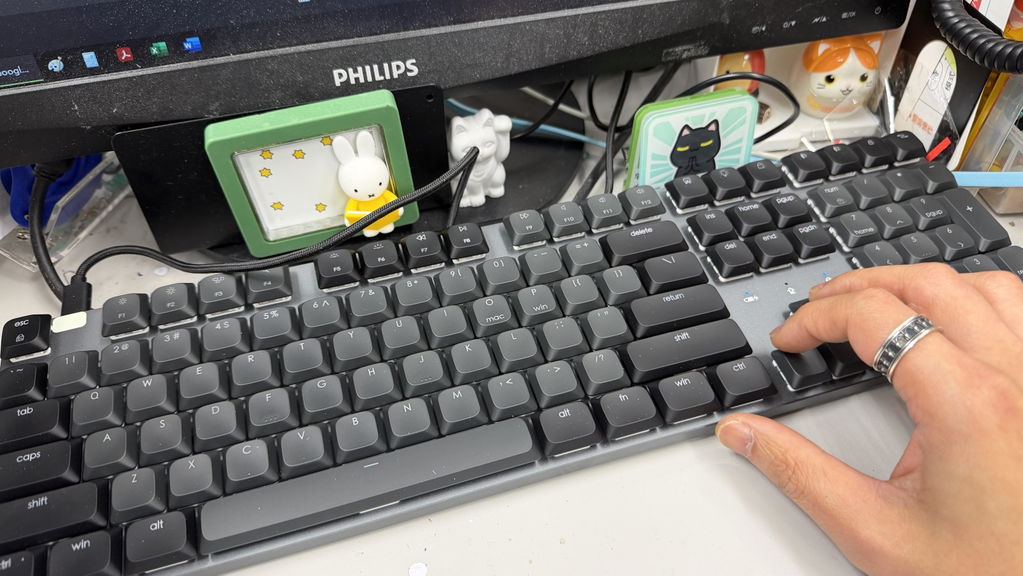
The Satechi SM3 Slim Mechanical Backlit Bluetooth Keyboard boasts a full numeric keypad, making it the perfect choice for business and office professionals whose tasks require extensive numerical input. Its sleek, minimalist design features an aluminum enclosure, adjustable feet, and removable keycaps.


Effortlessly power your workflow by connecting up to four devices at once, and instantly switch between them with the versatility of dual Bluetooth 5.0 channels, a 2.4 GHz USB receiver, and a reliable wired connection.
The SM3 Slim Mechanical Backlit Bluetooth Keyboard comes with a white backlight that supports 14 different patterns with three brightness levels, and four LED speeds.


Its adjustable feet allow users to tailor the angle of the keyboard for ultimate comfort and efficiency, reducing strain on the wrists and hands.
The SM3 Slim Mechanical Backlit Bluetooth Keyboard supports multiple operating systems including macOS, iPadOS, iOS, and Windows OS. It comes with specific OS keys (O and P) that allow users to quickly and conveniently transition between platforms.


The SM3 Slim Mechanical Backlit Bluetooth Keyboard features a rechargeable 2500mAh battery with a future-proof USB-C port that can be used for both charging and wired mode.


Yes! We have plans for keyboards with different configuration styles.
The SM3 keyboard can be used with both Mac and Windows computers.
The keyboard is set up for Mac use by default. The key labels match Mac keys. To support Windows users, the box includes extra keycaps:
2 Windows (WIN) keys
2 Alt keys
You may replace the Mac keycaps with these if you prefer a Windows-style layout.
The keyboard starts in Mac mode by default. You can switch modes based on the computer you are using.
O key = Mac mode
P key = Windows mode
Steps:
Press and hold the FN key.
While holding FN, press O for Mac or P for Windows.
Release the keys.
The selected key will briefly flash to confirm the change.
When the flashing stops, the keyboard is set to the selected mode.
If the ESC key is flashing, the keyboard is set so the F1–F12 keys work as standard function keys instead of media shortcuts.
This setting is controlled using the FN + ESC shortcut.
What this means:
F1–F12 work as normal function keys
Media controls (volume, brightness, play/pause) require holding the FN key
To switch back:
Press FN + ESC again.
The ESC key will stop flashing.
When the ESC key stops flashing, the media shortcut keys work normally without holding FN.
No. Our keyboards include a built-in power-saving feature:
Backlight decreases to Level 1 after 1 minute of inactivity Backlight turns off after 3 minutes of inactivity Keyboard enters sleep mode after 30 minutes of inactivity
This feature cannot be turned off as it is embedded in the keyboard’s firmware.
In my own views:
Pros:
- Have cable connection (one of the 3 ways you can choose from)
- Good-looking.
- Overall built is solid.
- White backlit (with different styles of blinking to choose from)
Cons:
- Keycap printing not clear on the Black keycap version if deactivated the backlit. Maybe I should but the white keycap version.
- if the backlit of the CAP lock can blinking like the Fn Lock would be nice.
Thank you for sharing such a detailed review. We really appreciate it!
Glad that you like the keyboard and thanks again for your support!